Hello there Disney people!
I posted recently about how to book your ADRs online and some of you may wonder why this is even something you should concern yourself with. I will tell you why - if you don't book ADRs be prepared to not eat at any of the top restaurants or to sit and wait if that is even an option.
Recently I was talking to some friends about ADRs and how important they are. Disney has some incredible restaurants to eat at. Some are higher end, some are buffets, some include characters, etc. Pretty much all of them will be impossible to get the day of if they are any good and most are!
I can't tell you how many times I have been down in Disney and heard people yelling at Cast Members (aka CMs - disney lingo!) at the reservation desks because there are no openings. They walk up to the Crystal Palace - where you can eat with Pooh and friends - at 6pm thinking they will just get to sit down and eat. I like to equate it to the best restaurant in NYC - would you ever think you could just walk up and sit down there? No. Well guess what pretty much every restaurant in Disney is this way! Especially at peak times of year.
Does this mean that without ADRs you won't be able to sit down to eat? No, not at all. BUT your chances of getting to eat all the places you want go down, way down. You can ALWAYS walk up and try, never hurts to try, right? But be prepared to hear no and to walk away knowing that...well I told you so - LOL! I have walked up and asked and been seated, but when that has happened I have also sat for 45 minutes waiting. So be prepared for that as well - with little ones that are hungry this is not always a good time.
If you booked way in advance as I have this time, you get to book at 180 days out from your arrival for your whole trip. In this case you will pretty much get your choice of where you want to eat. If you book later and the options have become more limited book what you can and as I said above try once you get there, never hurts. But my suggestion is to have the ADRs booked as a back up.
I will gladly help you with booking your ADRs, part of my FREE services!
Showing posts with label ADRs. Show all posts
Showing posts with label ADRs. Show all posts
Tuesday, April 5, 2011


Wednesday, March 30, 2011
Linking your Reservation to Disneyworld.com & ADRs
How to link your reservation to your disneyworld.com account and set up ADRs!
Linking your reservation to your Disneyworld.com account is great for many reasons! But the biggest one is it's help in the Adavanced Dining Reservation online booking system - aka ADRs. Gotta learn that Disney lingo! :-)
 |
| Click on My Reservations ^ |
 |
| Now click on Retrieve Reservations. |

 |
| See...I told you EASY! |
Once you have done that you will come to this lovely screen!

No go on and book away! Of course if you want I will help you with all of this, but you will have to give me login information to have it set to your account. As you can see in the above screen shot there is a link that says "I want to use my dining plan to book reservations". If you booked a Magic Your Way plus dining package you can use this. Comes in handy for those ADRs you have to prepay for - think Cinderella's Royal Table. Yes a credit card will still be needed to hold, but you won't have to prepay! Keep in mind if you get there and decide to pay out of pocket (I recommend this as it is not worth 2 dining credits!) you can, but also know that if you don't show or don't cancel within 48 hours they will charge your credit card that you used to hold it. So back to using your dining plan to book...click the link and then get to this screen:

Put in your information and yay all linked up!
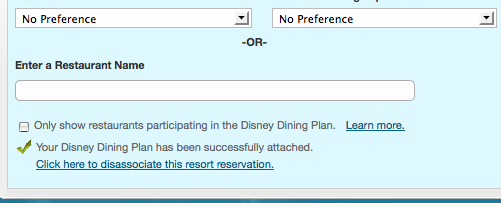
Now you can start booking. Once you have booked them because you have associated it to your reservation you will find all your ADR information on your main My Reservations page!
Like I said I will gladly do this process for you, but it will require that I get your disneyworld.com password. You can always change it if you want!
Happy Vacation Planning Disney friends!!!
Subscribe to:
Posts (Atom)